角色库管理
角色库就是你的“创作素材仓”。它不光是存图的地方,背后还有面部检测算法,能帮 3D 系统实现真正的精准匹配:让生成的图里,人物比例 100% 符合你的期待。
怎么上传效果最好?
想让 AI 插入更听话?建议你选这样的角色图:
- 看清脸:系统得能锁定双眼的位置,这样它才知道对焦高度该在哪。
- 半身或全身:这能给 AI 分享更多关于衣服、姿态和身材的信息。
- 背景越干净越好:虽然我们能搞定混合背景,但底子干净的话,AI 抓角色特征会更稳。
💡 温馨提示: 免费版用户最多可以保存 10 个角色模型。如果您是重度创作者,可以考虑解锁高级版获得无限存储配额。
“指谁打谁”的绑定逻辑
角色卡片和 3D 位子的配合很简单,原则就是“选了就自动绑上”:
- 在 3D 画布里先点一下那个小人(比如选粉色那个位子)。
- 在底下的角色库里,选一张你想要的角色图片。
- 卡片亮起彩色边框就说明绑好了。这时候点“智能插入”,这张图就会自动“对号入座”到对应的提示词空位里。
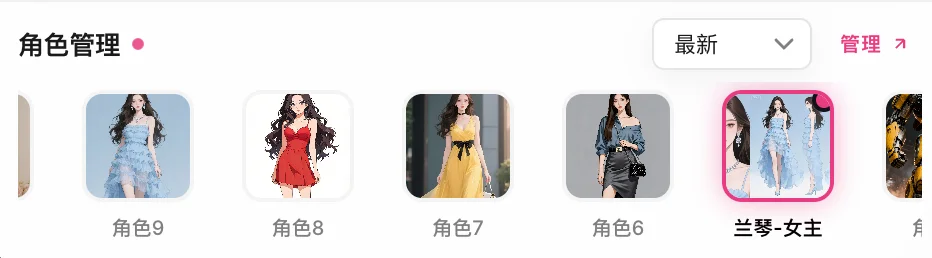
角色多了也不怕,好管得很
角色存多了,找起来费劲?试试这几个功能:
- 各种排序:按最新的排,或者看哪个用得最勤。
- 自定义顺序:长按卡片直接拖,想把谁放第一就放第一。
- 管理模式:点一下“管理”,进全屏大视图。批量重命名、删掉不要的角色,嗖嗖地快。
Character Library
The Character Library is your creative asset studio. Beyond storing images, it uses facial keypoint detection to help the 3D system achieve "100% accurate subject proportion matching."
Upload Best Practices
For best injection results, we recommend images with:
- Clear Faces: The system auto-locks eye positions to determine focus height.
- Medium/Full Body Shorts: Provides enough clothing and pose data for the AI.
- Clean Backgrounds: Simple backgrounds help AI extract character features more effectively.
💡 Note: Free tier users can save up to 10 characters. Upgrade to Backer / Donator for unlimited character storage and unrestricted creative freedom.
Quick Binding Logic
The library uses a "Select to Bind" workflow:
- Click an actor in the 3D viewport (e.g., the Pink slot).
- Select a card from the Character Library.
- A colored border confirms the binding. Smart Inject will now auto-route this image to the correct Prompt slot.
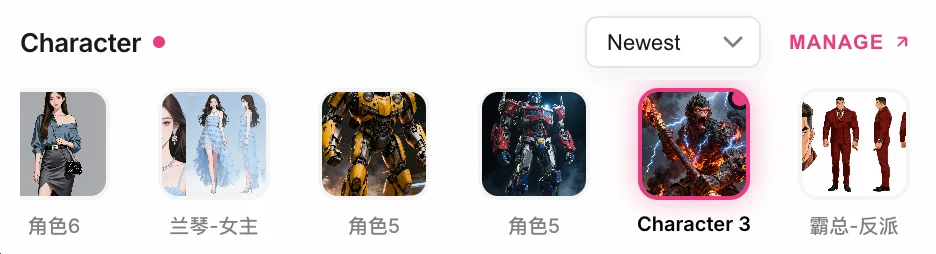
Management & Sorting
- Sorting Modes: Sort by Newest, Oldest, or Frequency.
- Custom Order: Hard press and drag cards to reorder them based on your creative flow.
- Management Modal: Click "Manage" to enter full-screen mode for bulk renaming or deletion.